Yank

Yank
License:
Trial version
Language:
English
Developer:
Developer's website
OS:
Mac OS X
Updated:
See detailed info

Softonic review

Nick Mead

“Make sure applications are properly removed”

by Nick Mead about Yank

It really annoys me when programs don't uninstall themselves properly when you move them to the Trash. Unfortunately, many leave behind files or folders that take up valuable space and resources.

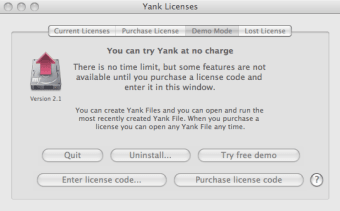
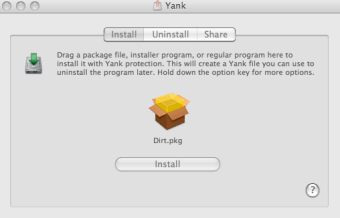
Yank is supposed to be a more powerful way to remove applications than dragging them to the Trash. The theory is, Yank works by monitoring the installation process of all the files you install so it knows every modification that's been made to your hard drive. To remove an application, simply click on the Yank file that it has created and click 'Uninstall'. Yank instantly removes anything that was originally installed with the program.

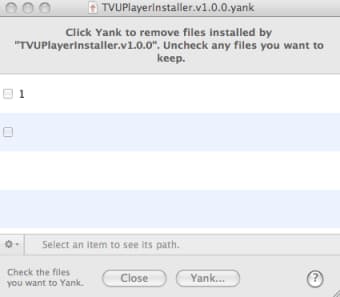
In practice however, I found Yank quite frustrating and awkward to use. For a start, you should be able to drag and drop DMG files into the Yank dock icon to make it work. Instead, you have to browse from the Yank interface to create a Yank file which is not only messy but lengthens the installation time. When it comes to removing the Yank file, I clicked on 'Uninstall', it found the Yank file I'd saved but just gave me two generic boxes (one labeled with the number 1) which I clicked and yet nothing happened. The 'Yank' button simply did not highlight, so I was unable to remove the program.

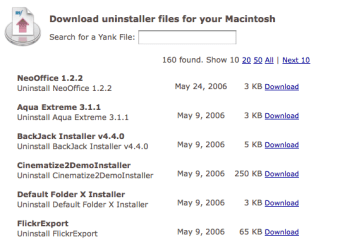
In addition, Yank gives you a 'Dirt.dmg' demo file to test it the first time you use it. However, if you accidentally fail to save the Yank file like I did, there seems to be no way of removing it and no way to make Yank prompt you to save it again. There is an online directory of Yank files to remove major programs where I was hoping I would find the Dirt.dmg Yank file but unfortunately, it was nowhere to be found so I´m stuck with 'Dirt.dmg' on my system.

Yank is a nice idea and there needs to be more of these kind of uninstaller programs but I'll be sticking with AppCleaner for now thanks.

Pros
  • Monitors installations
  • Online directory of Yank files
Cons
  • Awkward to use
  • Lengthens installation process
  • Doesn't always allow you to Yank
Download Yank 2.1

Yank is virus free

We have analyzed the latest version of Yank with 30 antivirus engines and it is virus free. See analysis results.

TESTED VIRUS FREE - Softonic GUARANTEED

Review and rate Yank

Your avatar

Your opinion is important.
Help other users - be the first to review this program.

Review
  1. Maximum: 75 characters

  2. See example

Pros and Cons
Rate
  1. What rating would you give Yank?

    You need to fill in all fields

    • Usability:

      Not rated
    • Stability:

      Not rated
    • Installation:

      Not rated
    • Functionality:

      Not rated
    • Appearance:

      Not rated
    • Overall rating:

      Not rated
  2. Don't worry, we won't make your email address public.

You're not allowed to share serial numbers, cracks, etc. or link to pages that contain them. If you do, your user account will be deleted, your IP address logged and legal action will be taken.

Get started - just ask a question!

Write a title for your question.

Alternativesto Yank

  • In English:
    Curb
    Curb

    Trash files from removable media

    Softonic rating:
    • 8/10
    User rating:
    • 10/10
  • Free:
    AppCleaner
    AppCleaner

    Fully uninstall applications on Mac

    Softonic rating:
    • 9/10
    User rating:
    • 8/10
Compare with Yank
Download rank: Uninstallers & Cleaners

47 of 50

Softonic rating:
  • Not bad
  • 6/10
User rating: (1 rating)
  • Essential
  • 10/10
Your rating:
Your rating
  • 0

Review and rate this program

Blog posts about Yank

More

Top Downloads: Uninstallers & Cleaners

  • United States
  • Global

  1. Fully uninstall applications on Mac

Older versions of Yank

Reviews of Yank in other languages